Migrating from Dynamics NAV to Business Central: A Step-by-Step Playbook

If your business runs Microsoft Dynamics NAV (Navision), you are in good company across East Africa — and on borrowed time. NAV served a generation of businesses brilliantly, but it is a product with a sunset. The modern successor, Dynamics 365 Business Central, is NAV's direct descendant: same DNA, cloud-native body, and a decade of new capability on top.
The good news is that a NAV-to-Business-Central move is an evolution, not a rip-and-replace. Here is the playbook we use to keep it predictable.
Why Move Now
- Support and security — older NAV versions fall out of mainstream support; you stop receiving updates and fixes.
- Copilot and modern features — AI assistance, e-invoicing, and the Power Platform are only on Business Central.
- Lower total cost — the cloud model removes server, upgrade, and maintenance overhead.
- Anywhere access — browser and mobile access for a distributed workforce.
The Five-Phase Path
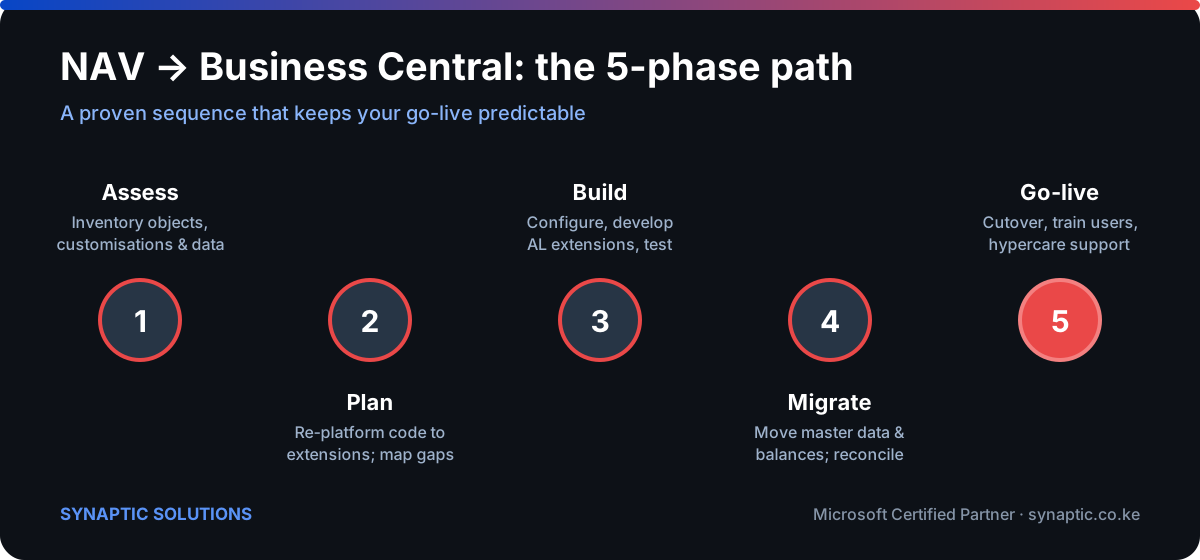
Phase 1 — Assess
Inventory everything: NAV version, every customisation and add-on, integrations, report objects, and data quality. This is where we separate what must move, what should be re-thought, and what can finally be retired.
Phase 2 — Plan
The biggest architectural shift from NAV to Business Central is that customisations become extensions rather than changes to the base objects. We map each customisation to a modern extension or a standard feature, and design the target configuration.
Phase 3 — Build
Configure Business Central, develop the required AL extensions, and rebuild reports. Everything is tested against real scenarios before any data moves.
Phase 4 — Migrate
Move master data and opening balances, then reconcile meticulously against NAV. Trial migrations surface the surprises early, while there is time to fix them.
Phase 5 — Go-live
Cutover on a planned date, train users, and provide intensive hypercare support in the critical first weeks. A rehearsed cutover is the difference between a smooth weekend and a painful month.
Common Pitfalls We Help Clients Avoid
- Lift-and-shift of dead customisations — moving code nobody uses inflates cost and risk. Migration is a chance to simplify.
- Underestimating data cleanup — garbage in NAV becomes garbage in Business Central. Clean before you move.
- Skipping the trial migration — the reconciliation step is not optional; it is where confidence is earned.
How Long and How Much?
A straightforward migration can complete in a few months; a heavily customised, multi-company NAV estate takes longer. The honest answer depends entirely on your Phase 1 findings — which is exactly why we start there. For the wider decision context, see our ERP selection framework.
Running NAV and wondering what a move would involve? Request a NAV upgrade assessment and we will scope it properly before anyone commits.